Saturday, June 20, 2009

Danger Bomb Clock gets you up and going with a bang

danger_bomb_clock1

Need a little extra prodding or hours of cajoling before you get out of bed? Need to dress in time, avoid wolfing down your breakfast and causing near-death encounters trying to catch the last morning shuttle to work? Then, here is an exciting new option for you to wake up with a bang: literally!
The Danger Bomb alarm clock works on a simple principle for arousing sleepy-heads: it scares you awake! Have not heard of that one yet?
Not quiet a bomb, but aspiring for explosive power status, the Danger Bomb alarm clock lets out a powerful array of continuous explosion sounds that need to be disabled physically by following a light-up code (which is reset every morning) and by unhooking the correct wire! A whole new perspective to getting an incentive to wake up every morning on time is not it not having to defuse a bomber-type alarm clock that yells for attention?

Source: Here

Rajnikant is gr8 Shooter

Source: Youtube

Friday, June 19, 2009

MyFolder Free Version

 MyFolder_Free_250

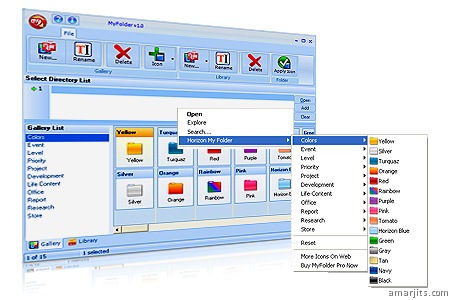
Click on a folder with the right button of the mouse and change the folder icon by My Folder. By clicking right button of the mouse on the folder; you can reach all the galleries those defined submenu under Horizon Myfolder Menu. Appearance of the any icons listed can be changed. Changing shape and color of the folders makes easier and faster Windows. Appearance of the folders is up to your choice by My Folder. Customize your computer by My Folder. Resetting and getting back to original icon is possible. Adding new icon and changing the look of the folders are possible. Folder icons can be stored as many as wanted under My Folder gallery section. You can create particular icon library and control the icons by My Folder. Icons defined in My Folder library can be transferred to the galleries in gallery section. My Folder provides adding folders with dll. exe. and icl. extensions to the library. Icon in library can be sent to gallery and used there.
Gallaries in My Folder. Colors.Levels, Project Galleries. Easy to use, Accelerates the process. Folder organizing is quicker.

My Folder Free Galleries
    * Colors
    * Event
    * Level
    * Priority
    * Project

Download it Here