Search

Wednesday, February 18, 2009

Desktops v1.0 – Create upto Four Virtual Desktops

cc817881_desktops2(en-us,MSDN_10)

Introduction

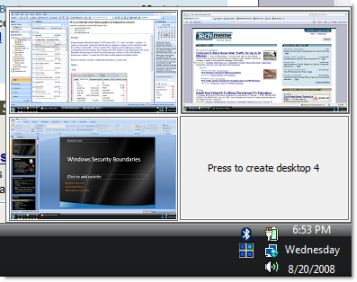
Desktops allows you to organize your applications on up to four virtual desktops. Read email on one, browse the web on the second, and do work in your productivity software on the third, without the clutter of the windows you’re not using. After you configure hotkeys for switching desktops, you can create and switch desktops either by clicking on the tray icon to open a desktop preview and switching window, or by using the hotkeys.

Using Desktops

Unlike other virtual desktop utilities that implement their desktops by showing the windows that are active on a desktop and hiding the rest, Sysinternals Desktops uses a Windows desktop object for each desktop. Application windows are bound to a desktop object when they are created, so Windows maintains the connection between windows and desktops and knows which ones to show when you switch a desktop. That making Sysinternals Desktops very lightweight and free from bugs that the other approach is prone to where their view of active windows becomes inconsistent with the visible windows.

Desktops reliance on Windows desktop objects means that it cannot provide some of the functionality of other virtual desktop utilities, however. For example, Windows doesn't provide a way to move a window from one desktop object to another, and because a separate Explorer process must run on each desktop to provide a taskbar and start menu, most tray applications are only visible on the first desktop. Further, there is no way to delete a desktop object, so Desktops does not provide a way to close a desktop, because that would result in orphaned windows and processes. The recommended way to exit Desktops is therefore to logoff.

Runs on:

  • Client: Windows XP and higher.
  • Server: Windows Server 2003 and higher

Download Now

Tuesday, February 17, 2009

Wireless Home Intercom System Makes Family Communication Easier

wireless-home-intercom-system

A big house might have seemed like a good idea when you bought it, but now it’s a chore rounding up the family members for dinner, school, work, or just a well-deserved yelling. Sure, an intercom system can make it easy to communicate across the house, but those have to be hardwired and installation is quite the chore, right?

Well, not if you get a wireless intercom system.

“This four-channel home intercom system was selected best by the Hammacher Schlemmer Institute for sound clarity, ease of use, range of use, and features. Unlike lesser models that transmit a signal through a home’s electrical system and cannot reach rooms on different circuits, this unit uses a wireless 900MHz digital spread spectrum signal to transmit clear, uninterrupted sound to every room, up to 1,000′, ensuring that all conversation is private and free from interference from other wireless devices in your house or the surrounding neighborhood.”

Most important, you can now yell at your kids from across the house, knowing that they’ll actually hear you. Via: Luxury Housing Trends.

Tulip Solar Lights

solar-tulip-landscape-lights

If you’re looking for cheerful landscape lights to brighten up your pathways at night, these tulips could be a fun choice.

The set of three tulip lights are solar powered, so there are no trenches to be dug for installing cables. You just stick them into the ground where the sun will hit the integrated solar panels during the day, and they’ll light the way at night.

The set comes with one red, one ivory, and one pink light. The flowers, stakes, and rechargeable batteries (which hold the solar charge) are included in the $40 price tag. Via: Luxury Housing Trends